
To adjust the cutting location, modify the Material Size and enable or disable Cut Center. When Cut Center is enabled, the machine uses the entered material width and height to place the cutting area in the center. When it is disabled, cutting starts approximately 8 mm from the material edge, which helps larger templates fit on the material.
How the Positioning Options Work
Material Size provides the width and height the machine uses for positioning. Cut Center then determines whether the cutting area is centered within those dimensions or begins near the material edge. The appropriate option depends on the type and size of film being cut.
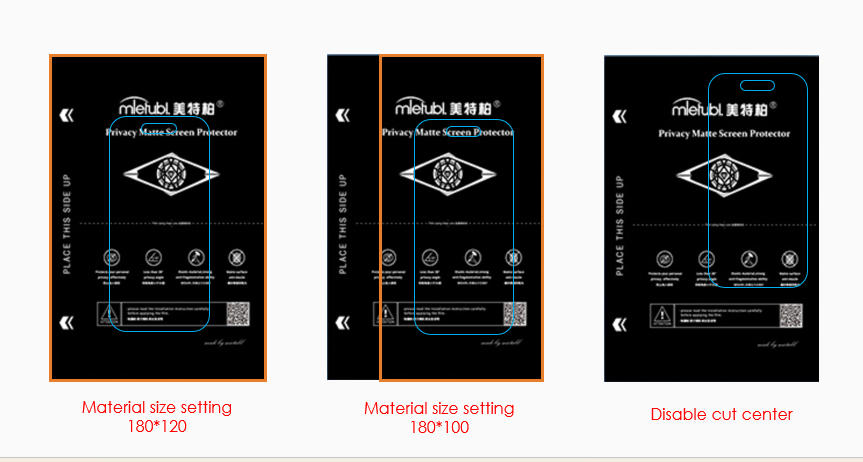
Cut Center is recommended for regular screen protector films and standard back films. Disabling it is intended for larger templates, including full-cover back films, where positioning the cut closer to the edge helps ensure that the entire shape fits on the material.
Adjust the Cutting Location
- Modify the Material Size. Enter the material width and height that the machine should use. When Cut Center is enabled, these dimensions determine the area within which the cutting design is automatically centered.
- Enable Cut Center for regular films. Use this setting for regular screen protector films and standard back films. The machine will automatically place the cutting area in the center of the material based on the width and height entered.
- Disable Cut Center for larger templates. Use this option for larger designs, such as full-cover back films. The machine will begin cutting approximately 8 mm from the material edge so the complete template can fit on the material.
Expected Cutting Position
With Cut Center enabled, expect the cutting area to be centered according to the entered material dimensions. With Cut Center disabled, expect the cut to start approximately 8 mm from the material edge rather than in the center. This edge distance is approximate, and the disabled setting is specifically suited to larger templates that need more of the available material area.
Was this article helpful?
Your feedback helps us improve future articles.