
Slices may be thrown out or cut incompletely halfway because the configured material size does not match the template. This is especially relevant when cutting full back film, whose cutting area is larger than standard templates. Disable the Cut Center option, then verify that the material size is correct and that the selected template matches the material being used.
Documented Symptom and Cause
The documented symptom is that some slices are thrown out partway through the cutting process. The usual cause is a mismatch between the material size settings and the template being used. If these sizes do not correspond, the cutting path may exceed the available material range and result in incomplete cutting.
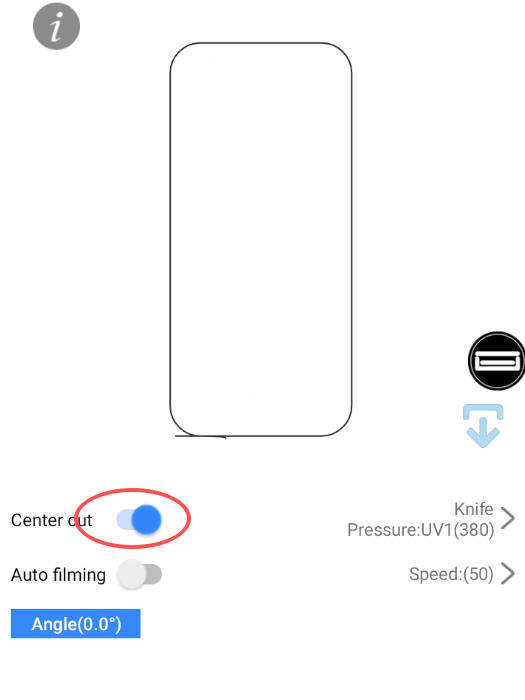
Full back film requires particular attention because its cutting area is larger than the area used by standard templates. With the default centering behavior active, the cutting path may not remain within the available cutting area.
Apply the Fix and Check the Size Settings
Use the following supported checks and remedy for full back film cutting:
- Disable Cut Center. Turn off the Cut Center option when performing full back film cutting. This allows the machine to use the entire material area rather than applying the default centering behavior.
- Check the configured material size. Confirm that the material dimensions are set correctly. One documented example is 180 mm × 120 mm; use the setting that correctly represents the material in use.
- Compare the template and material sizes. Verify that the selected template size matches the material. A size mismatch can cause the cutting path to extend beyond the available range.
Expected Result and Verification
After Cut Center is disabled for full back film cutting, the machine should be able to use the entire material area. The cutting path should remain within the available range, preventing the incomplete cutting associated with the default centering behavior.
If slices are still thrown out halfway, recheck both size-related conditions: the configured material dimensions must be correct, and the template must match the material being used. The documented remedy is specific to full back film cutting, while the size checks address the usual mismatch between the material settings and the selected template.
Was this article helpful?
Your feedback helps us improve future articles.