
If the touch screen responds slowly or does not respond at all, first confirm that the machine is using its original 24V / 2.7A power adapter. A non-original or incorrect adapter may cause either symptom and may also damage internal components. If the correct adapter is already in use, the LCD touch panel may be faulty. The documented remedy for a faulty panel is to replace the LCD screen.
Documented Symptom and Possible Causes
The documented issue includes a touch panel that responds slowly as well as one that stops responding entirely. The first possible cause is the power adapter. Using an adapter that is non-original or incorrect may interfere with touch-panel responsiveness.
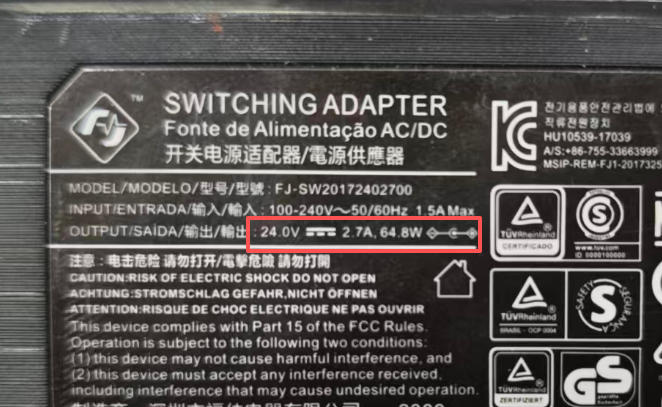
If the original adapter is already connected and has the specified 24V / 2.7A rating, the LCD touch panel itself may be malfunctioning. These are separate possibilities: the adapter should be checked before treating the LCD as faulty.
Checks and Supported Remedies
- Confirm that the adapter is original. Verify that the machine is using its original power adapter rather than a non-original replacement.
- Check the adapter specification. The original adapter should be rated at 24V / 2.7A. An incorrect adapter may make the touch panel slow or completely unresponsive and may damage internal components.
- Consider an LCD fault if the adapter is correct. When the original 24V / 2.7A adapter is already in use, a malfunctioning LCD touch panel may be responsible for the unresponsive behavior.
- Replace a faulty LCD screen. LCD replacement is the documented solution when the touch panel is malfunctioning.
Expected Result and Product Scope
Confirming the original 24V / 2.7A adapter rules out a non-original or incorrectly specified adapter as the identified power-related cause. If the adapter is correct and the LCD touch panel is faulty, replacing the LCD screen is the documented remedy for the unresponsive touch behavior.
The same screen-replacement method applies to all 180T series screens. This scope applies specifically to the replacement method; the initial adapter check remains part of troubleshooting the touch-response problem.
Obtaining a Replacement LCD
If an LCD replacement is needed, contact the local distributor or the seller of the machine. Request the replacement LCD through one of those sources before proceeding with the documented screen-replacement solution.
Was this article helpful?
Your feedback helps us improve future articles.